|
CDendro: The command "Add best member to target collection" is intended to help you crossdate an unsynchronized "source" collection.
CDendro: Alt-click on a collection member creates an empty collection, adds that member to it (as a "seed") and turns back to the source collection to allow for running Add best member... VERY USEFUL when you have to work with many subcollections. Sub-menu available on Right-click on any collection column header. CDendro: Show Cross correlations/Sort matrix: Sort by number of matches with T>=6.0: Will count the number of T>6 matchings between each sample and all the other samples. Useful to find a good starting point for a new subcollection. The numbers are stored in the "Sortkey"-row within the matrix (so see that you order display of the sortkey!). (The T-limit can be adjusted from e.g. 6 to 7 by Settings/More settings.) CDendro: Add best members to target collection can now check that there is a discrimination between the best match and the next best match by specification of a minimum difference between the best and the next-best T-values. CDendro: Warning on high-T duplicate matches: If a next best match has a T-value above 6, this will make a warning. CDendro: Stop for investigation in the middle of an automatic addition process: There is now a way to stop the auto-mode addition after the addition of a certain memberId. This is useful when rerunning an addition process where you want to analyze a questionable step done somewhere in the middle of the process. A note can be entered "by hand" into the "report-area". This is a way to add information which should not be forgotten. |
|

|
This collection contains 10 members which are not synchronized. Currently their
offsets are all set at zero!
You can download this collection from unsync.rwl We will now see how to easily synchronize these members using the "Add best members to target collection" button of CDendro. First we have to find a member to start from, i.e. one member that matches well towards several other members of the unsynchronized collection! |
|
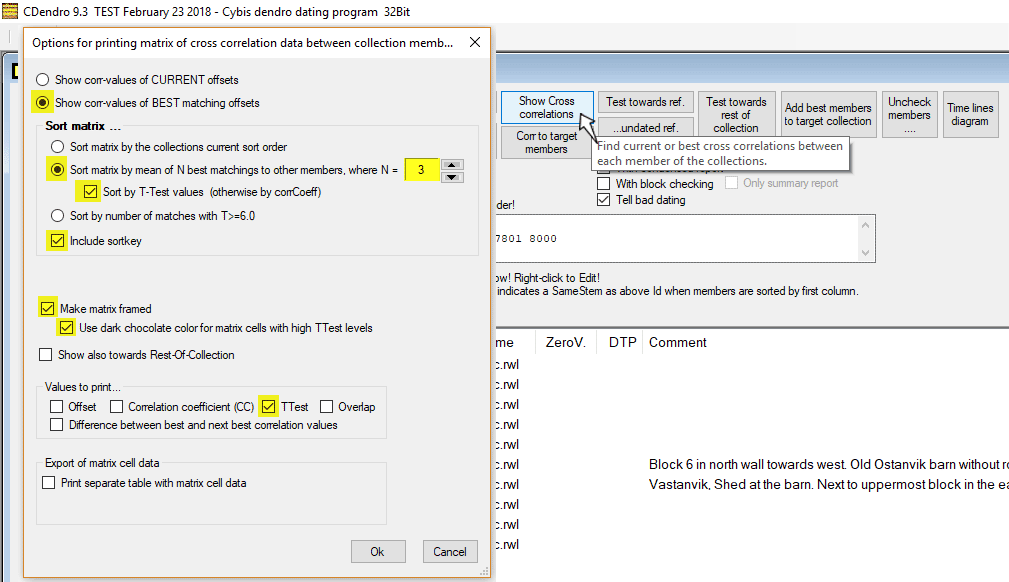
We start off by requesting a table showing how each member matches best to all other members.
To make the matrix small for this demonstration, we only look at the best TTest values, but you may
very well check several other items, e.g. correlation coefficient and overlap.
Note that we order the matrix sorted by the best matching members. |
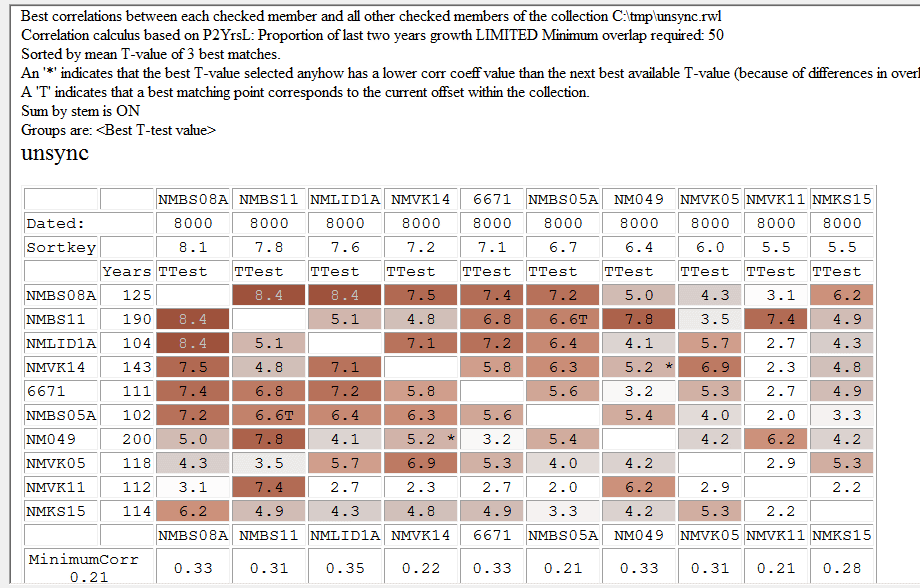
| Here we can see that NMBS08A could be a good starting point when building a new synchronized collection. It has six matches against other members of the collection with TTest values at 6 or above. |
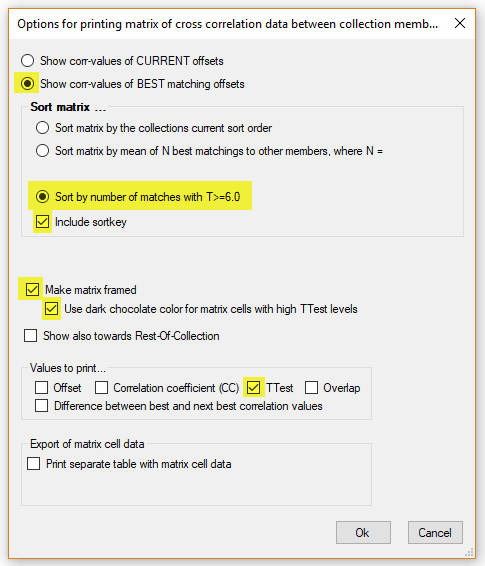 Another way to find a good starting point member, is to "ask" CDendro to look for collection members (samples) which match towards many other members of the source collection. I.e. to - for each member - calculate how many members it matches with a T-value greater than e.g. 6.0 and then sort all members by this value. Note: The threshold 6.0 above can be set with the command Settings/More settings/Show cross correlations/Sort by number of matches with T > 6.0 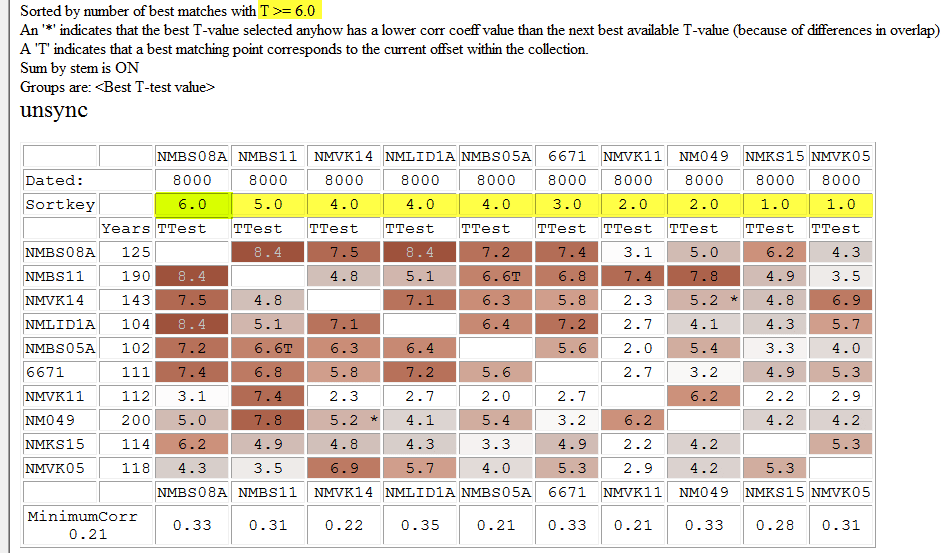 |
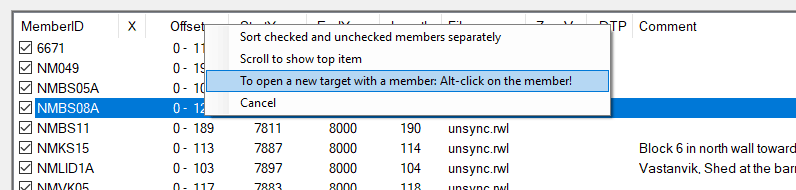
| So let us get a new empty target collection with the sample NMBS08A as the only member. It will then work as a "seed" that will attract other matching members of the source collection. |
|
The command "Alt-Click on NMBS08A" is the easiest way to both get a new target collection and have that member added to it. To achieve the same result, you might first create a new empty target collection, then double-click the NMBS08A in the source collection so it opens as a separate sample and then hit the button "Add to target collection". - Or you see that only NMBS08A is checked and then use the menu command Collections/Copy collection members to target collection. |

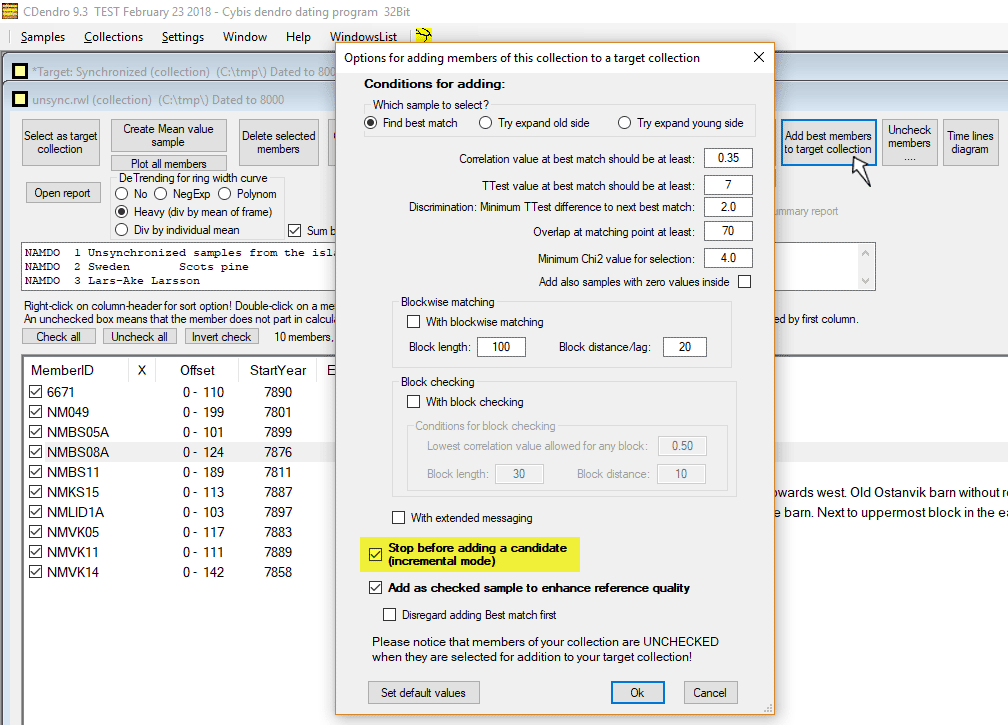
| We then turn to our unsynchronized (source) collection where we click the button "Add best members to target collection". We then set up the values as shown and click OK. |
|
|
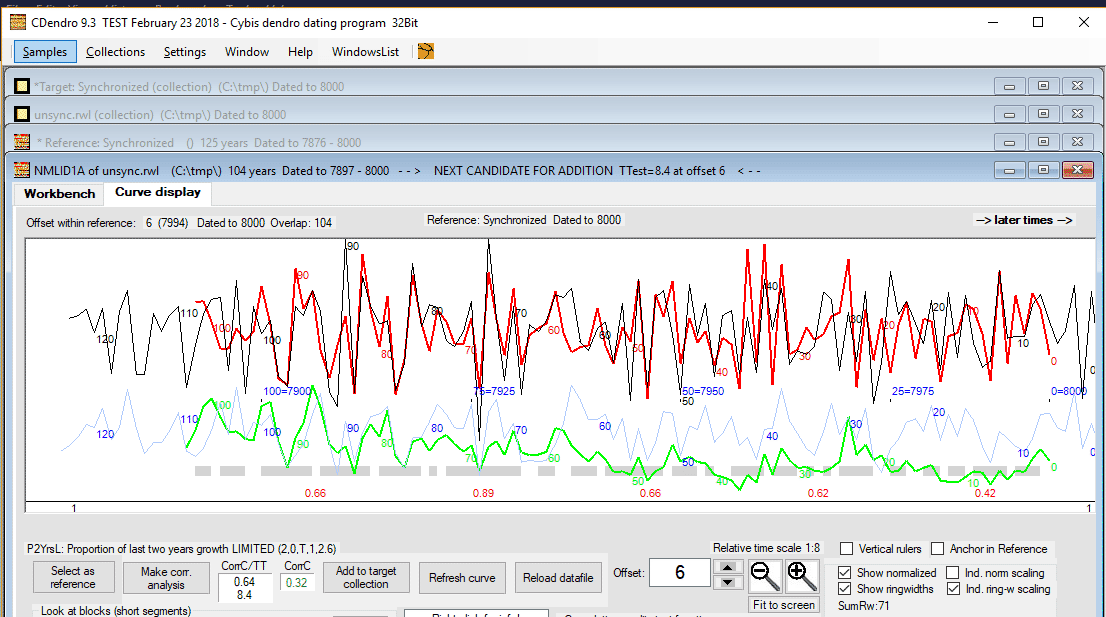
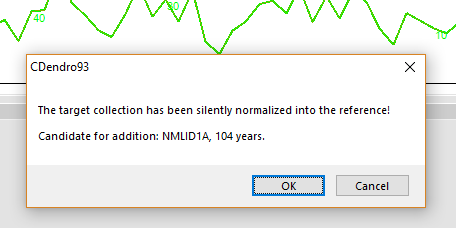
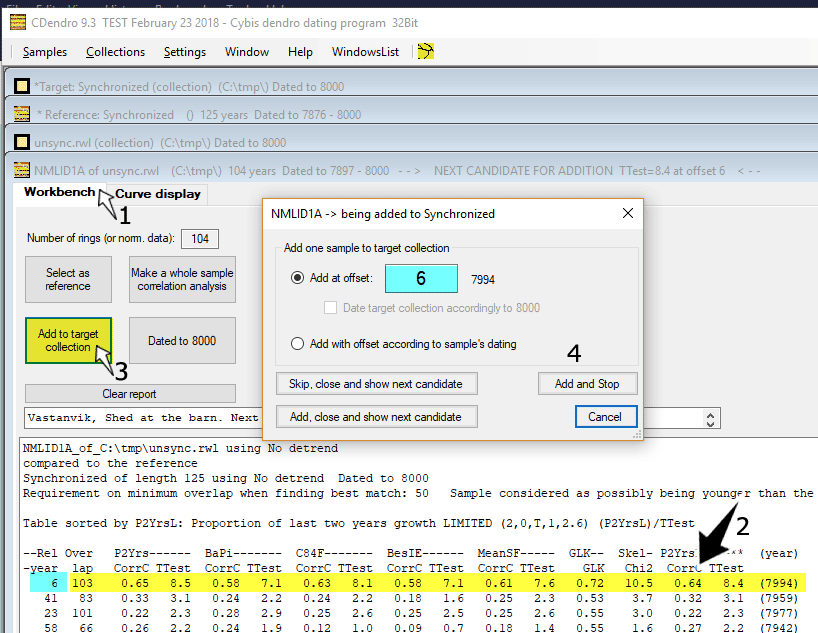
| NMLID1A will then be opened within a new "sample window" and compared towards the mean value of the members of the target collection, in this case just towards NMBS08A. If you accept this as a good match, you may very well click on the button "Add to target collection". |
|
Though here we wanted to investigate that match carefully, so we clicked the "Workbench" tab (1).
From a comparison with several normalization methods, the table shows that this can be considered a very good match (2). So we order the sample to be added to the target collection at offset 6 as shown above (3 and 4). This addition can be done either by clicking "Add, close and show next candidate" or by clicking "Add and Stop". For this demonstration we will click "Add and Stop". Then we close the NMLID1A sample window. |

|
|

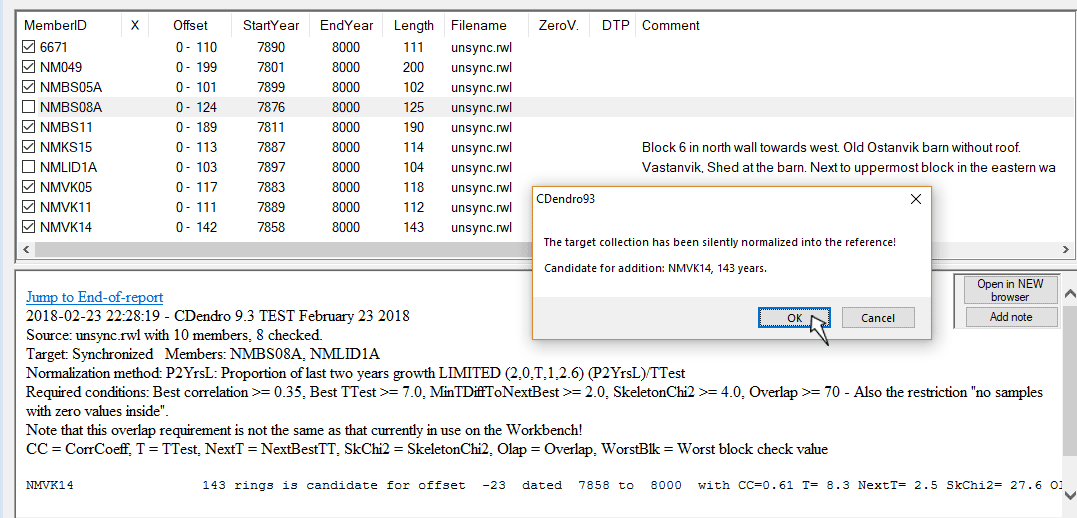
| We then turn back to our unsync.rwl source collection and click "Add best members to target collection". Please note that both NMBS08A and NMLID1A have been automatically unchecked, as they are already added to the target collection. When we click OK, CDendro will automatically update the mean value reference from our target collection and then start searching for the best matching new member. |
|
|
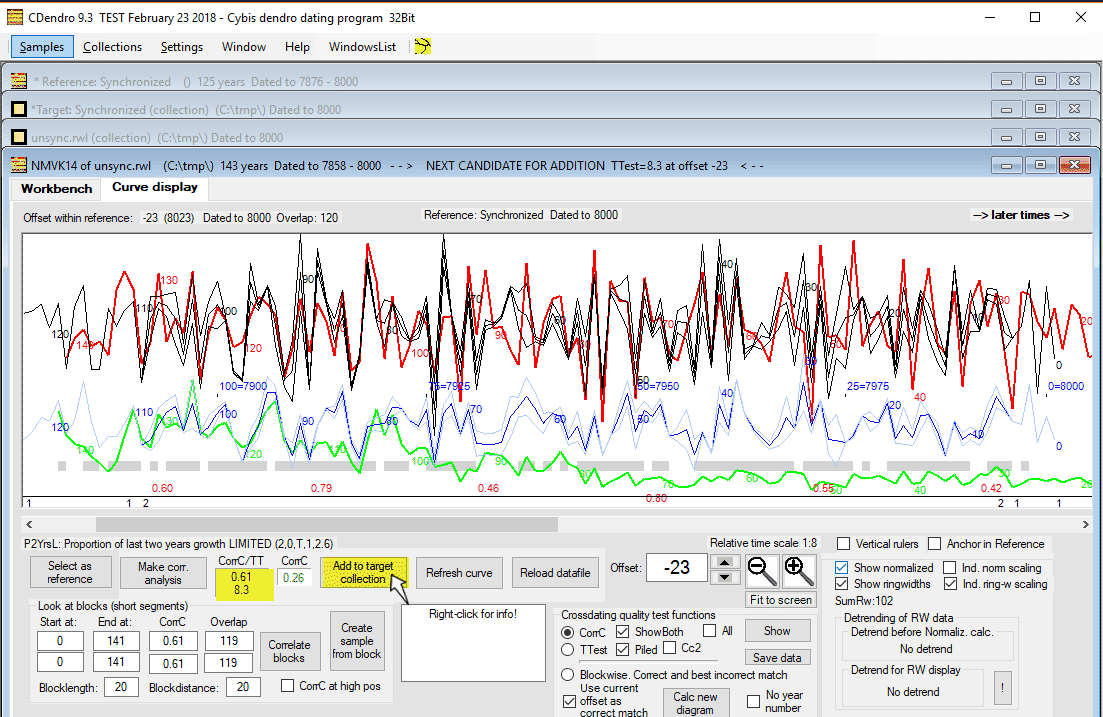
| The new candidate for addition, NMVK14, is now compared to a mean value of NMBS08A and NMLID1A, i.e. to a mean value of the target collection. |

| After we have added it to the target collection, we have three synchronized members, all at different offsets, within our target collection. |

|
We will now see how this adding process may run automatically!
See that the required TTest-value is set high enough, here at 7.0 Also see that the lowest allowed correlation coefficient for a 30 years long segment/block is set high enough, here at 0.35 Uncheck the "Stop before adding a candidate..." box and click OK! CDendro now first updates the mean value reference from the target collection. |
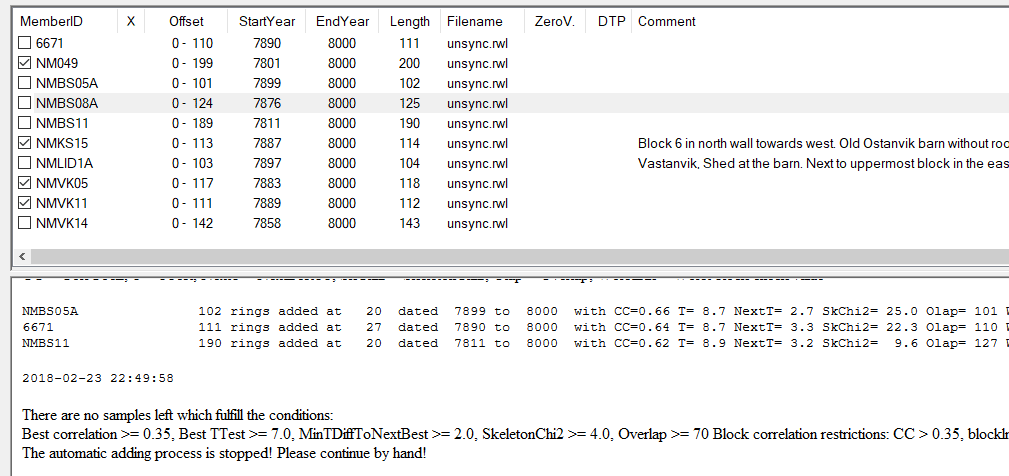
| CDendro then found the next three best matching members of the unsynchronized collection and added them to the target collection at synchronizing offsets. An updated mean value was then calculated from the target between each addition. Note that only the remaining - non-added - members above are still checked! |
|
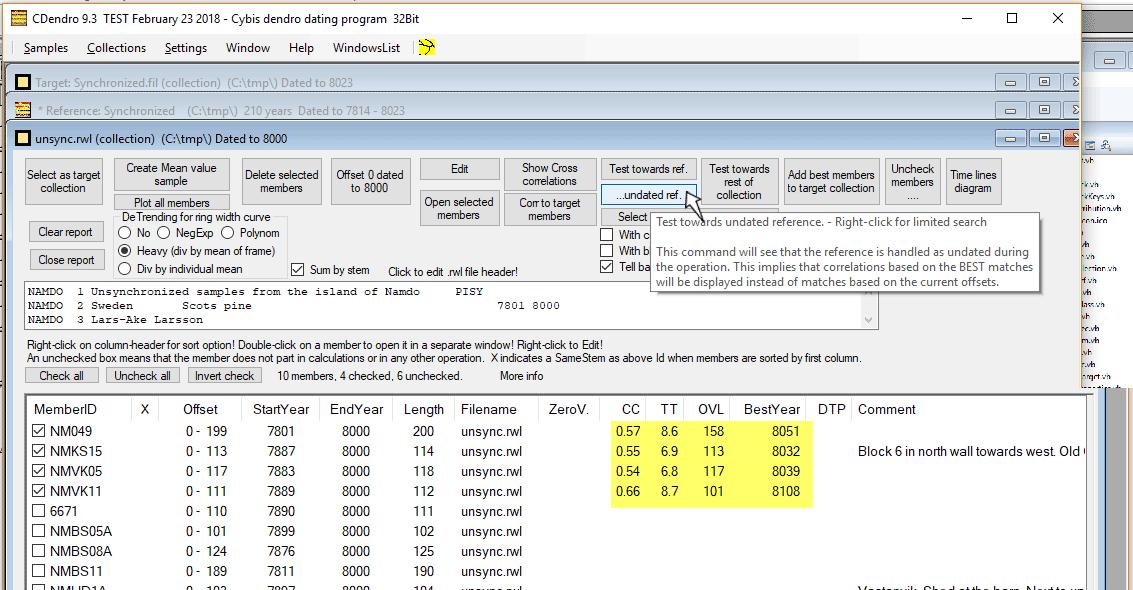
We will now match each remaining checked member of the unsynchronized collection towards a mean value of the target collection. To make CDendro look for the best match (and not the current match with current (wrong) datings) we use the "(Test towards)...undated ref." button as shown above. The yellow area above shows the main result from that button. NMVK11 is now the best matching member to add to the target collection. Please note that you can SORT the TT-column in ascending or descending order by clicking on the column header (TT). This is very useful when there are many members to be analyzed. |
|
To quickly add the remaining members, click "Add best member..." and uncheck "With block checking" before you click OK.
After we have all the remaining members added at synchronized offsets we have all members synchronized.
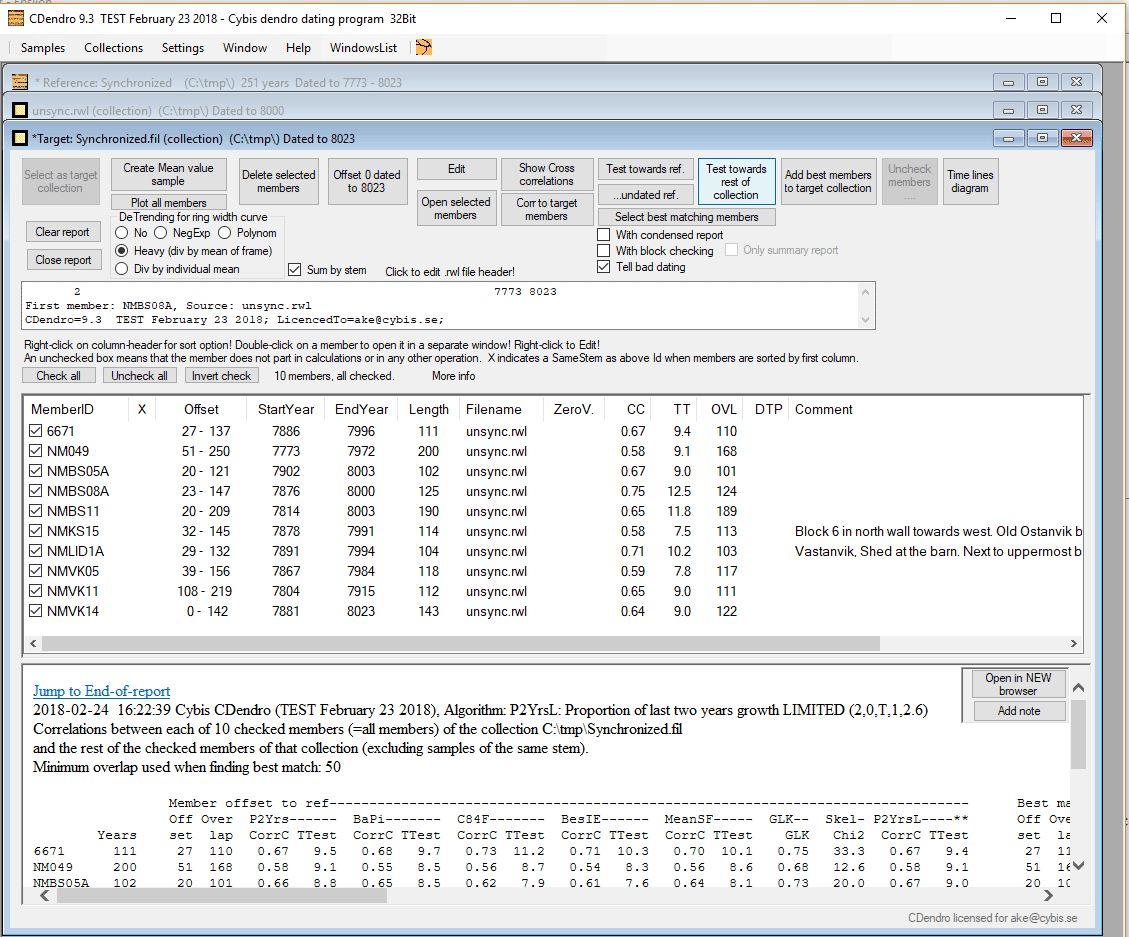
Running "Test towards rest of collection" will show very good correlation values (above). Note that by clicking on the headers of the CC or TT columns you can sort the collection members by increasing or decreasing Corr-coeff- or T-values! |
|
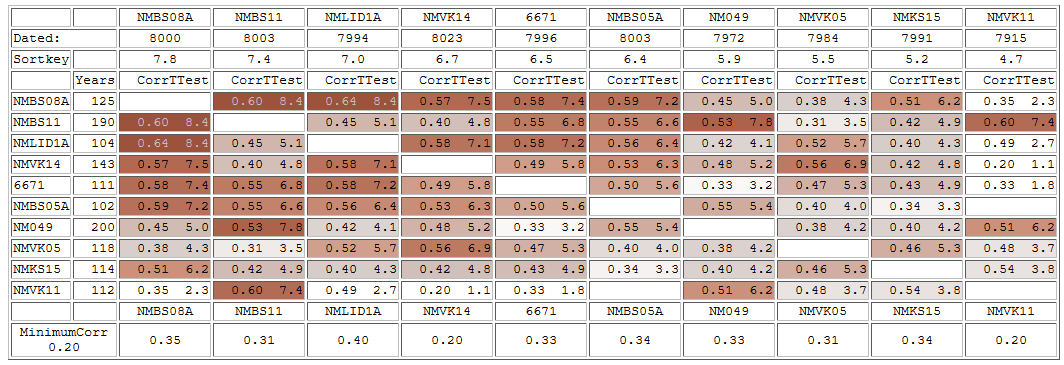
It is always a good habit to check how the individual members crossdate towards each other.
With an error within the first member which was added to an empty collection (e.g. an erroneous reference!) you may very well end up with a "synchronized" collection giving you good values when running "Test towards rest of collection". Though that collection is anyhow wrong, which could be revealed by a matrix as above where some members would then give conspicuously low correlation values. |
|
The original unsynchronized collection above was provisionally dated to 8000 while the target (synchronized) collection
then became dated to 8023. You may now create a mean value sample from your new collection and compare that to a known reference
so you can set a proper endyear to your synchronized collection.
In this case it was compared to a reference from the island of Nämdö and found to match at year 1895, see sync.rwl. |
More options

|
Try expand old side/Try expand young side Case: You want to synchronize a very big source collection covering a long time period. You start with a member which happens to be in the middle of the time span. You are interested in making CDendro build the collection towards older times. But CDendro finds it easier to pick up high quality matching members which build towards younger times. You can prevent CDendro from expanding the target collection towards younger times by selecting "Try expand old side". Requirement on TTest value We have found that when building a collection without prior knowledge of a correct reference, you should require a minumum TTest value of 7 for pine and 6 for oak. For more information see Validation of the supra-long pine tree-ring chronologies from northern Scandinavia Requirement for a Minimum Chi2 value Since the first versions of the "Add best member mechanisms", the new requirement "Minimum Chi2 value for selection" has been added. This is because - for some normalization methods - extremely narrow rings at different positions in a sample and in a reference might "attract each other" and thus fool the correlation calculus to find a false match (i.e. where the narrow rings overlap each other), see the section Methodology/Fooled by narrow rings and the normalization method. We have found that in such cases of a false match, we have always also found a low Chi2 value. With the requirement of a reasonably high Chi2 value for a match, we have thus reduced the risk of fooling this Add-best-member tool. Blockwise matching When there are some very long members with an error somewhere in the middle of the ring width sequence, there might be no good match to find towards a reference, though a block (segment) at one side of the error might give a high T-value when placed at the correct matching point. To overcome this and anyhow find such an erroneous member within a very big unsynchronized collection, you can turn on "Blockwise matching". Depending on the block length and overlap specified you might have to set the T-value somewhat lower than normally, e.g. at 6.0 to find a block of 100 years in length with a correlation coefficient above 0.52. Block checking When block checking is turned on, CDendro will see that all blocks (segments) of the best found member do have at least a minimum
correlation coefficient value against the current reference.
With extended messaging This option gives you a chance to see where block-checkings fail (i.e. where and for which member they give a too low value). Looking for errors: Stop autoAdd after adding ident... Insert a sample identity in this field if you want the automatic addition process to stop at that point. This might be useful during an addition process rerun after you have got unexpected values. Add as checked sample to enhance reference quality. In a process as described above this option should always be checked.
Disregard adding Best match first. Normally CDendro looks for the very best matching sample for addition. With a very big source collection, this may take a long time to calculate. With this option checked, CDendro will successively add any sample found that fullfills the requirements specified (e.g. T >= 7). This will speed up the addition process considerably. February 24 2018 (first version Sept. 17 2010, second version August 24 2013) Lars-Åke Larsson, www.cybis.se |